Send Message Action
Table of Contents
Functionality
When any time I want to send a message to chat I use a custom Send Message action for a few reasons.
- Allows me to later add the ability to send messages to other platforms if I want to multi-stream
- Allows me to use other extensions for sending messages (There is a great one on the Streamerbot Discord that gives your twitch bot the bot badge!)
- Allows anyone that uses my extensions to just change this action to make it match how they want to send messages
Examples
Basic Twitch
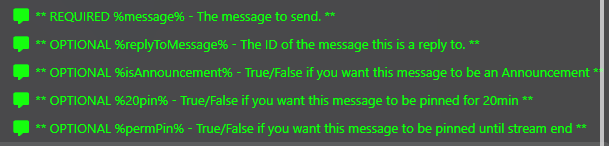
Twitch messages can be a reply, an announcement, or can be pinned. So we want to handle all those cases.
1. Check if Reply
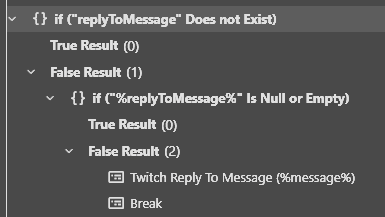
Add an If/Else statement for checking if replying
Core > Logic > If/Else
Input: replyToMessage
The argument for the message to reply to (NOTE there is no % cuz where are checking if it exists)
Operation: Does Not Exist
Then we wanna double check if the reply isn't empty. So add another If/Else statement in the False of the one before (Just incase some wants to send 2 messages and ohave the first be reply so they empty the argument).
Core > Logic > If/Else
Input: replyToMessage
The argument for the message to reply to (NOTE there is % cuz where are checking if it null or empty)
Operation: Is Null or Empty
Then we just simply send the message as a reply if the False of the If/Else.
Twitch > Chat > Reply To Message
Reply Id: %replyToMessage%
The argument for the message to reply to
Message: %message%
The argument for the message to send
And Finally just add a Break since we are done and a message was sent (so we don’t have to have ever If/Else inside each other)
2. Check if Announcment
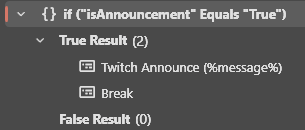
Add an If/Else statement for checking if announcment
Core > Logic > If/Else
Input: %isAnnouncement%
The argument set to True if you want an announcement
Operation: Equals
Value: True
OPTIONALLY you could add a Switch Case with an extra argument for the color of the announcement.
Then we just simply send the message as a reply in the True of the If/Else.
Twitch > Chat > Send Announcement to Channel
Message: %message%
The argument for the message to send
And Finally just add a Break since we are done and a message was sent (so we don’t have to have ever If/Else inside each other)
3. Check if Pinned
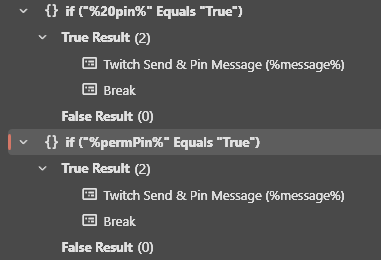
Something can be Pinned for 20min or until end of stream when sending a message so….
Add an If/Else statement for checking if pinned for 20 min
Core > Logic > If/Else
Input: %20pin%
The argument set as True if wanting the message pinned for 20 min
Operation: Equals
Value: True
Then we just simply send the message pinned for 20min.
Twitch > Chat > Send Message to Channel
Message: %message%
The argument for the message to send
Pin: Marked as On
Then Add another If/Else statement after the one above for checking if pinned until end of stream
Core > Logic > If/Else
Input: %20pin%
The argument set as True
Operation: Equals
Value: True
Then we just simply send the message pinned until end of stream
Twitch > Chat > Send Message to Channel
Message: %message%
The argument for the message to send
Pin: Marked as On
Until stream ends: Marked as On
And Finally just add a Break since we are done and a message was sent (so we don’t have to have ever If/Else inside each other)
4. Send Message Normally
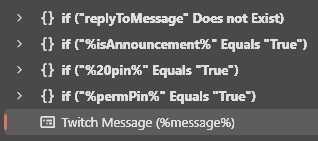
If we have gotten past all the checks we just send the message as normal.
Twitch > Chat > Send Message to Channel
Message: %message%
The argument for the message to send
Full Action: Download
Basic Youtube

Youtube sending messages is simple so we just send the message
YouTube > Send Message to Channel
Message: %message%
The argument for the message to send
Full Action: Download
Basic Kick

Kick messages can be a reply or just a regular message. So we want to handle both those cases.
1. Check if Reply
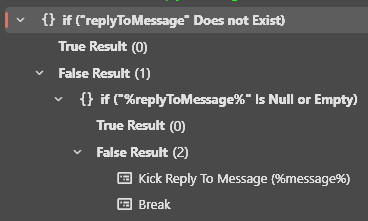
Add an If/Else statement for checking if replying
Core > Logic > If/Else
Input: replyToMessage
The argument for the message to reply to (NOTE there is no % cuz where are checking if it exists)
Operation: Does Not Exist
Then we wanna double check if the reply isn't empty. So add another If/Else statement in the False of the one before (Just incase some wants to send 2 messages and ohave the first be reply so they empty the argument).
Core > Logic > If/Else
Input: replyToMessage
The argument for the message to reply to (NOTE there is % cuz where are checking if it null or empty)
Operation: Is Null or Empty
Then we just simply send the message as a reply if the False of the If/Else.
Twitch > Chat > Reply To Message
Reply Id: %replyToMessage%
The argument for the message to reply to
Message: %message%
The argument for the message to send
And Finally just add a Break since we are done and a message was sent (so we don’t have to have ever If/Else inside each other)
2. Send Message Normally

If we have gotten past all the checks we just send the message as normal.
Twitch > Chat > Send Message to Channel
Message: %message%
The argument for the message to send
Full Action: Download
Basic Multiplatform
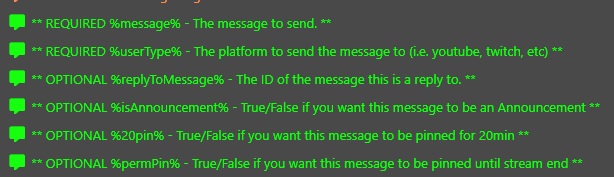
We can use the above actions to make one action for all platforms with a simple switch.
Core > Logic > Switch
Input: %userType%
The argument for the for the platform to send the message to (named userType to match the platform of command users more easily)
Then just add a case for each platform and call the action from above
- youtube - Send Message (Basic Youtube)
- twitch - Send Message (Basic Twitch)
- kick - Send Message (Basic Kick)
Full Action: Download