Earning Currency
Table of Contents
Functionality
An economy system needs a way for viewer’s to earn the currency. This is done by giving the viewer currency when certain triggers (or actions) happen. This extension adds a ton of ways that viewers can earn currency and shows how to give them currency in those situations.
Ways to earn currency I’ve implemented are:
- Exchanging Channel Points
- Check In Redeem
- Subscribe/Resubscribe
- Gift Subscriptions
- Watch Streak
- Using Bits
- Raiding
- Sending Messages
- By Watch Time*
* Requires C# Code
Keep in mind most of these will be platform dependent and I will be showing how to do it with twitch but it could be implemented with any platform. Also these are just examples, you can allow viewers to earn currency in other ways using similar logic to the way these are implemented.
Prerequisites
You must have a global user variable for your currency setup in streamerbot. If you don’t have one you can follow this tutorial to make your own or even just grab the premade extension from that tutorial.
How To Make It Yourself
Each section will cover how to implement a way of earning currency as listed in Functionality. You can do all of them, some of them, or even use them to make your own.
Skip around as you want and copying completed ones and just editing them for others can really speed up the process.
Full Video
Exchanging Channel Points
You can allow viewers to earn your currency by trading in twitch channel through channel point redeems.
1. Create Channel Point redeems

You can create the rewards on twitch or through streamerbot itself. I recommend through streamerbot because that will allow more control in streamerbot. Go to Platforms -> Twitch -> Channel Point Rewards to add new rewards or see your current ones.
Add a Channel Point Redeem for each exchange value you want to allow.
Add Twitch Channel Reward
Reward Name: Buy 10 Tokens
The name of the redeem that the viewer sees. You want to set this relative to amount of currency the viewer will get.
Description: Exchange your channel points for 10 Tokens
Description of the redeem. Recommend putting in the ammount they will earn from the redeem
Cost: 1000
The cost of the redeem. I will show you how to implement it so the cost determines how much they currency they get. (i.e. 1/100 of the cost is tokens earned, 1000 cost = 10 tokens)
2. Create Action & Add triggers

Add a new action for when someone redeems your channel point redeems.
Then add a Trigger for each channel point redeem to allow this one action to handle all of them at once.
Twitch > Channel Reward > Reward Redemption
Reward: Buy 10 Tokens
The channel point rewards you created in Step 1.
3. Get the amount of currency to give the viewer

Set an argument to the amount we want to give viewer, calculated from the cost of the redeem redeemed.
Core > Arguments > Set Argument
Variable Name: amount
The name of the variable to store the amount we want to give the viewer
Value: $math(%rewardCost%/100)$
The actual amount to give the viewer. Using an inline math we can make it 1/100 of the cost of the redeem. Using a \ instead of a / will truncate the decimal so its always a whole number.
4. Actually give the viewer the Currency
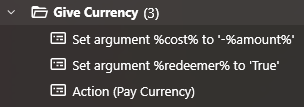
Set arguments for Pay Currency Action2 and then Call it to adjust the viewer's currency.
Core > Arguments > Set Argument
Variable Name: redeemer
The name of the variable pay currency wants to know to adjust the redeemer.
Value: True
Set to True since we want to give the currency to the viewer who triggered the action.
Core > Arguments > Set Argument
Variable Name: cost
The name of the variable pay currency wants to know how much to adjust the viewer’s currency by.
Value: -%amount%
The amount to give the viewer. We set it to negative because pay currency decrements, so we “pay” a negative to give currency.
Core > Actions > Run Action
Action: Pay Currency
The action for actually adjusting a viewer’s currency
5. (OPTIONAL) Get info for and send a message with new viewer balance
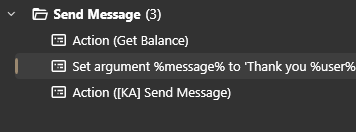
Get the new balance of the viewer using the Get Balance Action2.
Core > Actions > Run Action
Action: Get Balance
The action for getting the current balance of the viewer. We don’t need to set redeemer again cuz we set it earlier for the pay currency action
Actually send the message by setting argument for the message and using a send message action.1
Core > Arguments > Set Argument
Variable Name: message
The name of the variable for the send message action to know what message to send.
Value: Thank you %user% for exchanging %rewardCost% for %amount% ~currencyNamePlural~. Your current ~currencyName~ balance is %balance% ~currencyNamePlural~
The actual message to send. The example shows how to use a bunch of variables for a custom message. (Note, using ~ for global variables and % for local ones)
Core > Actions > Run Action
Action: [KA] Send Message
The action for actually sending a message
Check In Redeem
You can allow viewers to earn your currency by checking in once a day with a channel point redeem.
1. Create Channel Point redeem

You can create the reward on twitch or through streamerbot itself. I recommend through streamerbot because that will allow more control in streamerbot. Go to Platforms -> Twitch -> Channel Point Rewards to add a new reward or see your current ones.
Add a Channel Point Redeem for checking in.
Add Twitch Channel Reward
Reward Name: Check In
The name of the redeem that the viewer sees.
Description: Daily Check in for 50 Tokens
Description of the redeem the viewer sees
Cost: 1
The cost of the redeem. I set this to 1 since it will only be useable once a stream but you can set it to whatever you want.
Max Per User Per Stream: 1
The amount of times each viewer can use this per stream. Set to 1 for a typical daily check-in.
Persist User Counter: Marked As On
Makes streamer bot count the times viewers use the redeem even across multiple streams. (I turn this on for displaying it on redeem)
2. Create Action & Add trigger

Add a new action for when someone checks in.
Then add a Trigger for the check in channel point redeem
Twitch > Channel Reward > Reward Redemption
Reward: Check In
The channel point reward you created in Step 1.
3. Give the viewer the Currency
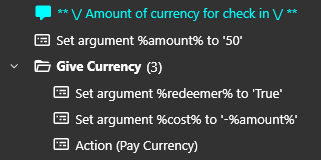
Set arguments for Pay Currency Action2 and then Call it to adjust the viewer's currency.
Core > Arguments > Set Argument
Variable Name: amount
The name of the variable to store the amount we want to give the viewer
Value: 50
The actual amount to give the viewer.
Core > Arguments > Set Argument
Variable Name: redeemer
The name of the variable pay currency wants to know to adjust the redeemer.
Value: True
Set to True since we want to give the currency to the viewer who triggered the action.
Core > Arguments > Set Argument
Variable Name: cost
The name of the variable pay currency wants to know how much to adjust the viewer’s currency by.
Value: -%amount%
The amount to give the viewer. We set it to negative because pay currency decrements, so we “pay” a negative to give currency.
Core > Actions > Run Action
Action: Pay Currency
The action for actually adjusting a viewer’s currency
4. (OPTIONAL) Get info for and send a message with new viewer balance
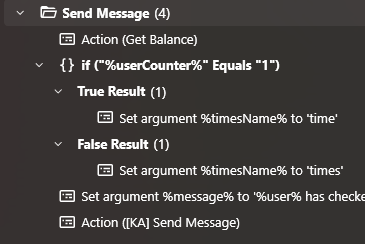
Get the new balance of the viewer using the Get Balance Action2.
Core > Actions > Run Action
Action: Get Balance
The action for getting the current balance of the viewer. We don’t need to set redeemer again cuz we set it earlier for the pay currency action
Determine if this is their first check-in or not. Then store a variable for singular or plural number of check ins.
Core > Logic > If/Else
Input: %userCounter%
The amount of times the viewer has used the check in, tracked by streamerbot for us.
Operation Equals
Value 1
True (aka Singular)
Core > Arguments > Set Argument
Variable Name: timesName
Unquie name for the word to use for number of times a viewer has checked in
Value: time
False (aka Plural)
Core > Arguments > Set Argument
Variable Name: timesName
Unquie name for the word to use for number of times a viewer has checked in
Value: times
Actually send the message by setting argument for the message and using a send message action.1
Core > Arguments > Set Argument
Variable Name: message
The name of the variable for the send message action to know what message to send.
Value: %user% has checked in %userCounter% %timesName% <3 You get %amount% ~currencyNamePlural~ for checking in <3 Your current ~currencyName~ balance is %balance%
The actual message to send. The example shows how to use a bunch of variables for a custom message. (Note, using ~ for global variables and % for local ones)
Core > Actions > Run Action
Action: [KA] Send Message
The action for actually sending a message
Subscription/Resubscription
You can allow viewers to earn your currency by subscribing and resubscribing
1. Create Action & Add triggers

Add a new action for when someone subscribes or resubscribes
Then add a Trigger for both subscriptions & resubscriptions.
Twitch > Subscriptions > Subscription
Twitch > Subscriptions > Resubscription
2. Get the amount of currency to give the viewer
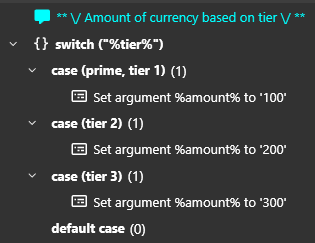
Add a Switch/Case to figure out which tier the viewer subbed with
Core > Logic > Switch
Input: %tier%
The tier of the sub, set by streamerbot from twitch.
case (prime, tier1)
Core > Arguments > Set Argument
Variable Name: amount
Name for variable for how much we going to give the viewer
Value: 100
The amount of currency to give the viewer when they sub or resub at prime & tier 1 subs.
case (tier2)
Core > Arguments > Set Argument
Variable Name: amount
Name for variable for how much we going to give the viewer
Value: 200
The amount of currency to give the viewer when they sub or resub at tier 2 subs.
case (tier3)
Core > Arguments > Set Argument
Variable Name: amount
Name for variable for how much we going to give the viewer
Value: 300
The amount of currency to give the viewer when they sub or resub at tier 3 subs.
3. Actually give the viewer the Currency
Set arguments for Pay Currency Action2 and then Call it to adjust the viewer's currency.
Core > Arguments > Set Argument
Variable Name: redeemer
The name of the variable pay currency wants to know to adjust the redeemer.
Value: True
Set to True since we want to give the currency to the viewer who triggered the action.
Core > Arguments > Set Argument
Variable Name: cost
The name of the variable pay currency wants to know how much to adjust the viewer’s currency by.
Value: -%amount%
The amount to give the viewer. We set it to negative because pay currency decrements, so we “pay” a negative to give currency.
Core > Actions > Run Action
Action: Pay Currency
The action for actually adjusting a viewer’s currency
4. (OPTIONAL) Get info for and send a message with new viewer balance
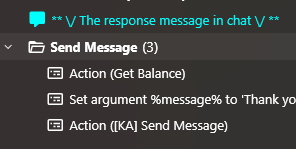
Get the new balance of the viewer using the Get Balance Action2.
Core > Actions > Run Action
Action: Get Balance
The action for getting the current balance of the viewer. We don’t need to set redeemer again cuz we set it earlier for the pay currency action
Actually send the message by setting argument for the message and using a send message action.1
Core > Arguments > Set Argument
Variable Name: message
The name of the variable for the send message action to know what message to send.
Value: Thank you %user% for the %tier% sub! You earned %amount% ~currencyNamePlural~! Your current ~currencyName~ balance is %balance%
The actual message to send. The example shows how to use a bunch of variables for a custom message. (Note, using ~ for global variables and % for local ones)
Core > Actions > Run Action
Action: [KA] Send Message
The action for actually sending a message
Gift Subscriptions
You can allow viewers to earn your currency by gifting subscriptions
1. Create Action & Add triggers

Add a new action for when someone gifts subscriptions
Then add a Triggers for gifting one sub and many subs.
Twitch > Subscriptions > Gift Bomb
Anonymous: Marked as Off
Mark anonymous as off so anonymous gifts won’t trigger this action since we don’t know who gifted so can’t give them currency.
Twitch > Subscriptions > Gift Subscription
Anonymous: Marked as Off
Mark anonymous as off so anonymous gifts won’t trigger this action since we don’t know who gifted so can’t give them currency.
2. Check for Gift subs in a bomb
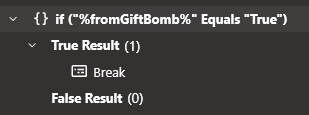
We need to ignore any single gift subs that are part of a bomb because we are handling gift bombs as well.
So we add a If/Else to check for a single gift sub from a gift bomb.
Core > Logic > If/Else
Input: %fromGiftBomb%
Variable streamerbot uses to tell us a single gift sub is from a bomb
Operation Equals
Value True
True (aka Gift sub from bomb)
Core > Logic > Break
Just end the action since we are handling these subs as part of the whole gift bomb.
3. Get the amount of currency to give the viewer
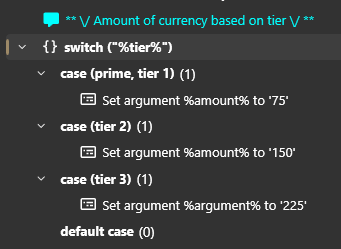
Add a Switch/Case to figure out which tier the viewer gifted subs of
Core > Logic > Switch
Input: %tier%
The tier of the gift sub, set by streamerbot from twitch.
case (tier1)
Core > Arguments > Set Argument
Variable Name: amount
Name for variable for how much we going to give the viewer
Value: 75
The amount of currency to give the viewer when they gift tier 1 subs.
case (tier2)
Core > Arguments > Set Argument
Variable Name: amount
Name for variable for how much we going to give the viewer
Value: 150
The amount of currency to give the viewer when they gift tier 2 subs.
case (tier3)
Core > Arguments > Set Argument
Variable Name: amount
Name for variable for how much we going to give the viewer
Value: 225
The amount of currency to give the viewer when they gift tier 3 subs.
3. Adjust the amount by number of subs or months
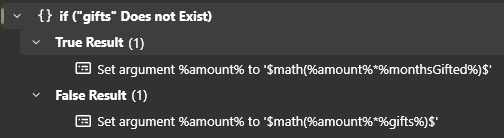
We want to give currency for every month gifted and for every sub gifted in a bomb so we need to handle both.
So add a If/Else to check for multiple gift subs
Core > Logic > If/Else
Input: gifts
Name of the variable streamerbot uses to tell us how many subs gifted in a bomb. (NOTE not using % because we are checking if it exists)
Operation Does Not Exist
True (aka a single gift sub)
Core > Arguments > Set Argument
Variable Name: amount
Name for variable for how much we going to give the viewer
Value: $math(%amount%*%monthsGifted%)$
Simple inline math to multiple the amount we are giving the viewer by the number of months they are gifting.
False (aka a gift bomb)
Core > Arguments > Set Argument
Variable Name: amount
Name for variable for how much we going to give the viewer
Value: $math(%amount%*%gifts%)$
Simple inline math to multiple the amount we are giving the viewer by the number of subs they are gifting.
4. Actually give the viewer the Currency
Set arguments for Pay Currency Action2 and then Call it to adjust the viewer's currency.
Core > Arguments > Set Argument
Variable Name: redeemer
The name of the variable pay currency wants to know to adjust the redeemer.
Value: True
Set to True since we want to give the currency to the viewer who triggered the action.
Core > Arguments > Set Argument
Variable Name: cost
The name of the variable pay currency wants to know how much to adjust the viewer’s currency by.
Value: -%amount%
The amount to give the viewer. We set it to negative because pay currency decrements, so we “pay” a negative to give currency.
Core > Actions > Run Action
Action: Pay Currency
The action for actually adjusting a viewer’s currency
5. (OPTIONAL) Get info for and send a message with new viewer balance
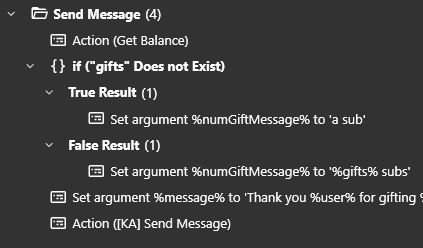
Get the new balance of the viewer using the Get Balance Action2.
Core > Actions > Run Action
Action: Get Balance
The action for getting the current balance of the viewer. We don’t need to set redeemer again cuz we set it earlier for the pay currency action
Add an If/Else to check a single gift sub or multiple
Core > Logic > If/Else
Input: gifts
Name of the variable streamerbot uses to tell us how many subs gifted in a bomb. (NOTE not using % because we are checking if it exists)
Operation Does Not Exist
True (aka a single gift sub)
Core > Arguments > Set Argument
Variable Name: numGiftMessage
Name for a variable to have different text for one or multiple gift subs.
Value: a sub
Text for when one sub is gifted
False (aka a gift bomb)
Core > Arguments > Set Argument
Variable Name: numGiftMessage
Name for a variable to have different text for one or multiple gift subs.
Value: %gifts% subs
Text for when multiple subs are gifted using the number of subs
Actually send the message by setting argument for the message and using a send message action.1
Core > Arguments > Set Argument
Variable Name: message
The name of the variable for the send message action to know what message to send.
Value: Thank you %user% for gifting %numGiftMessage%! You earned %amount% ~currencyNamePlural~! Your current ~currencyName~ balance is %balance%
The actual message to send. The example shows how to use a bunch of variables for a custom message. (Note, using ~ for global variables and % for local ones)
Core > Actions > Run Action
Action: [KA] Send Message
The action for actually sending a message
Watch Streak
You can allow viewers to earn your currency by getting twitch watch streaks.
1. Create Action & Add trigger

Add a new action for when someone gets a watch streak.
Then add a Trigger for a Watch Streak
Twitch > Chat > Watch Streak
2. Get the amount of currency to give the viewer

Set an argument to the amount we want to give viewer, calculated from the number of the watch streak.
Core > Arguments > Set Argument
Variable Name: amount
The name of the variable to store the amount we want to give the viewer
Value: $math(if(%watchStreak% # 50 == 0, 100, 10))$
The actual amount to give the viewer. Using an inline math we can make it give 100 currency when its a watch streak divisible by 50 and otherwise it gives 10 currency.
3. Actually give the viewer the Currency
Set arguments for Pay Currency Action2 and then Call it to adjust the viewer's currency.
Core > Arguments > Set Argument
Variable Name: amount
The name of the variable to store the amount we want to give the viewer
Value: 50
The actual amount to give the viewer.
Core > Arguments > Set Argument
Variable Name: redeemer
The name of the variable pay currency wants to know to adjust the redeemer.
Value: True
Set to True since we want to give the currency to the viewer who triggered the action.
Core > Arguments > Set Argument
Variable Name: cost
The name of the variable pay currency wants to know how much to adjust the viewer’s currency by.
Value: -%amount%
The amount to give the viewer. We set it to negative because pay currency decrements, so we “pay” a negative to give currency.
Core > Actions > Run Action
Action: Pay Currency
The action for actually adjusting a viewer’s currency
4. (OPTIONAL) Get info for and send a message with new viewer balance
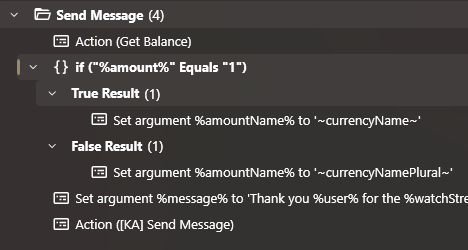
Get the new balance of the viewer using the Get Balance Action2.
Core > Actions > Run Action
Action: Get Balance
The action for getting the current balance of the viewer. We don’t need to set redeemer again cuz we set it earlier for the pay currency action
Actually send the message by setting argument for the message and using a send message action.1
Core > Arguments > Set Argument
Variable Name: message
The name of the variable for the send message action to know what message to send.
Value: Thank you %user% for the %watchStreak%! You earned %amount% ~currencyNamePlural~! Your current ~currencyName~ balance is %balance%
The actual message to send. The example shows how to use a bunch of variables for a custom message. (Note, using ~ for global variables and % for local ones)
Core > Actions > Run Action
Action: [KA] Send Message
The action for actually sending a message
Using Bits
You can allow viewers to earn your currency by using bits.
1. Create Action & Add trigger

Add a new action for when someone uses bits.
Then add a Trigger for using Bits
Twitch > Chat > Cheer
2. Get the amount of currency to give the viewer

Set an argument to the amount we want to give viewer, calculated from the bits used.
Core > Arguments > Set Argument
Variable Name: amount
The name of the variable to store the amount we want to give the viewer
Value: $math(%bits%\10+1)$
The actual amount to give the viewer. Using an inline math we can make it give 1 currency for every 10 bits used plus 1 so it always gives something. (Note the use of \ instead of / to do integer math, meaning it gets rid of any decimals)
3. Actually give the viewer the Currency
Set arguments for Pay Currency Action2 and then Call it to adjust the viewer's currency.
Core > Arguments > Set Argument
Variable Name: amount
The name of the variable to store the amount we want to give the viewer
Value: 50
The actual amount to give the viewer.
Core > Arguments > Set Argument
Variable Name: redeemer
The name of the variable pay currency wants to know to adjust the redeemer.
Value: True
Set to True since we want to give the currency to the viewer who triggered the action.
Core > Arguments > Set Argument
Variable Name: cost
The name of the variable pay currency wants to know how much to adjust the viewer’s currency by.
Value: -%amount%
The amount to give the viewer. We set it to negative because pay currency decrements, so we “pay” a negative to give currency.
Core > Actions > Run Action
Action: Pay Currency
The action for actually adjusting a viewer’s currency
4. (OPTIONAL) Get info for and send a message with new viewer balance
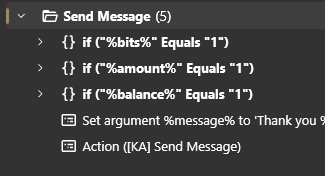
Get the new balance of the viewer using the Get Balance Action2.
Core > Actions > Run Action
Action: Get Balance
The action for getting the current balance of the viewer. We don’t need to set redeemer again cuz we set it earlier for the pay currency action
Determine if a single bit or multiple were used. Then store a variable for singular or plural number of bits.
Core > Logic > If/Else
Input: %bits%
The number of bits the viewer used, tracked by streamerbot for us.
Operation Equals
Value 1
True (aka Singular)
Core > Arguments > Set Argument
Variable Name: bitName
Unquie name for the word to use for number of bits used
Value: bit
False (aka Plural)
Core > Arguments > Set Argument
Variable Name: bitName
Unquie name for the word to use for number of bits used
Value: bits
Determine if the amount being given to the viewer is singular or plural. Then store a variable for singular or plural amount.
Core > Logic > If/Else
Input: %amount%
The amount we gave to the viewer of currency.
Operation Equals
Value 1
True (aka Singular)
Core > Arguments > Set Argument
Variable Name: amountName
Unquie name for the word to use for the amount of currency we gave to the viewer
Value ~currencyName~
The global variable for singular currency
False (aka Plural)
Core > Arguments > Set Argument
Variable Name: amountName
Unquie name for the word to use for the amount of currency we gave to the viewer
Value ~currencyNamePlural~
The global variable for plural currency
Determine if the new balance of the viewer is singular or plural. Then store a variable for singular or plural balance.
Core > Logic > If/Else
Input: %balance%
The current balance of the viewer’s currency.
Operation Equals
Value 1
True (aka Singular)
Core > Arguments > Set Argument
Variable Name: balanceName
Unquie name for the word to use for the balance of the viewer
Value ~currencyName~
The global variable for singular currency
False (aka Plural)
Core > Arguments > Set Argument
Variable Name: balanceName
Unquie name for the word to use for the balance of the viewer
Value ~currencyNamePlural~
The global variable for plural currency
Actually send the message by setting argument for the message and using a send message action.1
Core > Arguments > Set Argument
Variable Name: message
The name of the variable for the send message action to know what message to send.
Value: Thank you %user% for the %bits% %bitName%! You have earned %amount% %amountName% <3 You now have %balance% %balanceName%
The actual message to send. The example shows how to use a bunch of variables for a custom message. (Note, using ~ for global variables and % for local ones)
Core > Actions > Run Action
Action: [KA] Send Message
The action for actually sending a message
Raiding
You can allow viewers to earn your currency by raiding.
1. Create Action & Add trigger

Add a new action for when someone raids.
Then add a Trigger for raids
Twitch > Raid > Raid
Min: 1
The min number of people in a raid to get currency. (Set this if you are worried about people spaming small raids for currency)
2. Give the viewer the Currency
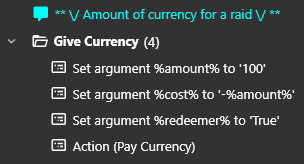
Set arguments for Pay Currency Action2 and then Call it to adjust the viewer's currency.
Core > Arguments > Set Argument
Variable Name: amount
The name of the variable to store the amount we want to give the viewer
Value: 100
The actual amount to give the viewer.
Core > Arguments > Set Argument
Variable Name: redeemer
The name of the variable pay currency wants to know to adjust the redeemer.
Value: True
Set to True since we want to give the currency to the viewer who triggered the action.
Core > Arguments > Set Argument
Variable Name: cost
The name of the variable pay currency wants to know how much to adjust the viewer’s currency by.
Value: -%amount%
The amount to give the viewer. We set it to negative because pay currency decrements, so we “pay” a negative to give currency.
Core > Actions > Run Action
Action: Pay Currency
The action for actually adjusting a viewer’s currency
3. (OPTIONAL) Get info for and send a message with new viewer balance
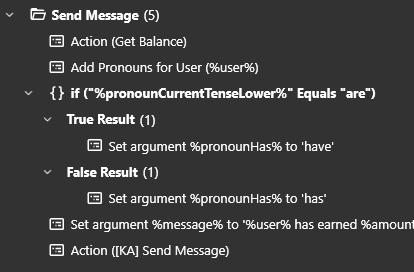
Get the new balance of the viewer using the Get Balance Action2.
Core > Actions > Run Action
Action: Get Balance
The action for getting the current balance of the viewer. We don’t need to set redeemer again cuz we set it earlier for the pay currency action
Get the pronouns of the viewer using the built-in integration and an If/Else for knowing if to use Has or Have.
Integrations > Pronouns > Add Pronouns for User
User Login: %user%
The viewer to get the pronouns of.
Core > Logic > If/Else
Input: %pronounCurrentTenseLower%
If the viewer should have “are” or “is” used with their pronouns.
Operation Equals
Value are
Check to see if they use “are” because then we should use “have” (or use “has” if they use “is”).
True (aka uses “are”)
Core > Arguments > Set Argument
Variable Name: pronounHas
Unquie name for the variable to use for has/have
Value: have
False (aka uses “is”)
Core > Arguments > Set Argument
Variable Name: pronounHas
Unquie name for the variable to use for has/have
Value: has
Actually send the message by setting argument for the message and using a send message action.1
Core > Arguments > Set Argument
Variable Name: message
The name of the variable for the send message action to know what message to send.
Value: %user% has earned %amount% ~currencyNamePlural~ for raiding <3 %pronounSubject% now %pronounHas% %balance% ~currencyNamePlural~
The actual message to send. The example shows how to use a bunch of variables for a custom message. (Note, using ~ for global variables and % for local ones)
Core > Actions > Run Action
Action: [KA] Send Message
The action for actually sending a message
Sending Messages
By Watch Time (REQUIRES C# Code)
1 You can always just send a message through twitch or whatever platform you want but I use another action called Send Message Explained here for compability with other extensions and platforms.
2 The Pay Currency and Get Balance Actions are created in my Economy Basics Tutorial/Extension. Feel free to use any other way for adjusting currency and getting a viewer’s balance if you have a different existing implementation.