Economy for YouTube (USES C# CODE)
Since YouTube does NOT have a get user info sub-action you can not use Target as the Source when getting and setting global variables. You can get user’s variables by name and/or id using a tiny bit of code though. You will have to edit the Pay Currency & Get Balance Actions since they are the only places of my economy extensions that edit global variables. You will also have to edit any place you would get target user and just skip it for youtube since there is no way to varify a username exists.
Table of Contents
Get Balance

First we will need more info when getting a user balance. If they are a youtube user, if we wanna search by Id or username, and the actual Id or username to search with it. So Can add some comments listing those arguments for refrence.
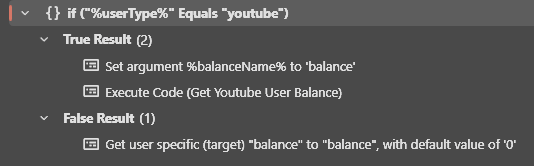
Since redeemer does work with the Globals (Get) sub-action we only need to check if they are youtube when not redeemer.
So Add an If/Else statement for checking if youtube in the False of the top most If/Else
Core > Logic > If/Else
Input: %userType%
The argument for the type of user to know what platform we working on
Operation: Equals
Value: youtube
The text value of the youtube platform to check for
Then in the False just put the Globals (Get) sub-action from before.
And add the following code to the True to get the youtube variable. (Each part explained in the comments <3)
Core > C# > Excute C# Code
using System;

public class CPHInline
{
	// The name of the global variable for your currency
	const string BALANCE_NAME = "balance";

	public bool Execute()
	{
		// Check if we want to get the user by Id or by user name and the name or id
		CPH.TryGetArg("byId", out bool byId);
		CPH.TryGetArg("targetUser", out string targetUser);

		// Create variable for storing the users balance
		int balance = 0;

		if(byId){
			// Get the users balance by Id
			balance = CPH.GetYouTubeUserVarById<int>(targetUser, BALANCE_NAME, true);
		}
		else{
			// Get the users balance by name
			balance = CPH.GetYouTubeUserVar<int>(targetUser, BALANCE_NAME, true);
		}

		// Save the balance to argument for use by calling action
		CPH.SetArgument(BALANCE_NAME, balance);

		return true;
	}
}
OPTIONALY change the BALANCE_NAME variable at the top to the name of your currency variable if it’s different from balance.
Full Action: Download
Pay Currency
Just like Get balance we will need more info when adjusting a user’s balance. If they are a youtube user, if we wanna search by Id or username, and the actual Id or username to search with it. So Can add some comments listing those arguments for refrence.
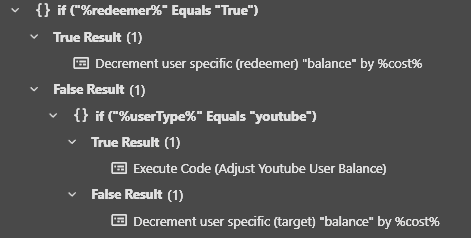
Then just like above (in the Get Balance) Action open up the If/Else until you find the If/Else that is “%redeemer%” Equals “True” because that is the only place we actually directly affect the global variable.
So Add an If/Else statement for checking if youtube in the False of that If/Else
Core > Logic > If/Else
Input: %userType%
The argument for the type of user to know what platform we working on
Operation: Equals
Value: youtube
The text value of the youtube platform to check for
Then in the False just put the Globals (Set) sub-action from before.
And add the following code to the True to adjust the youtube variable. (Each part explained in the comments <3)
Core > C# > Excute C# Code
using System;

public class CPHInline
{
	// The name of the global variable for your currency
	const string BALANCE_NAME = "balance";

	public bool Execute()
	{
		// Get the amount we want to pay and the current balance
		CPH.TryGetArg("cost", out int cost);
		CPH.TryGetArg(BALANCE_NAME, out int balance);

		// Check if we want to set the user by Id or by user name and the name or id
		CPH.TryGetArg("byId", out bool byId);
		CPH.TryGetArg("targetUser", out string targetUser);

		if(byId){
			// Adjust the users balance by Id and by the cost
			CPH.SetYouTubeUserVarById(targetUser, BALANCE_NAME, balance-cost, true);
		}
		else{
			// Adjust the users balance by name and by the cost
			CPH.SetYouTubeUserVar(targetUser, BALANCE_NAME, balance-cost, true);
		}

		return true;
	}
}
OPTIONALY change the BALANCE_NAME variable at the top to the name of your currency variable if it’s different from balance.
Full Action: Download